
As I mentioned in the previous two posts, event operations are crucial for community operations. Using an offline open-source meetup as an example, I will walk through how to organize a community event.
This post is long. If you prefer, scroll to the end for the mind map.
Clarify the purpose#
Before organizing an event, we must first clarify the purpose: why are we holding it, and what outcome do we want?
Once the purpose is clear, we can break down the steps accordingly.
For an offline meetup (technical sharing and networking), the purpose is simple: gather local community users in a city, organize technical sharing and交流, and empower attendees. If the event is live-streamed, the content can also empower users who are not there. So a meetup often impacts far more than the tens or hundreds of people onsite.
Define the budget#
Events have costs: venue, materials (banners, posters), refreshments, gifts, promotion, and more.
The budget often determines the scale and how “premium” the event feels.
Define roles and steps#
An event includes many tasks. To ensure each task finishes on time, work must be split into detailed responsibilities, with one or more people accountable.
There should also be an overall owner who tracks progress, reminds people, and keeps the timeline on track.
Below is a simplified breakdown for an offline meetup.
Decide location and time#
First, decide the city. Then estimate attendance.
In tier-1 cities, attendance is often over 100. In tier-2 cities, around 50. In smaller cities, fewer.
Once you have an estimate, choose a suitable venue.
Typical venue types:
- Hotel conference halls
- Shared spaces like cafes or co-working spaces
- Office meeting rooms
Hotels fit large events, but for technical communities they are usually used for commercial purposes, not meetups.
Cafes and co-working spaces are great for meetups but cost more.
Office meeting rooms are the lowest cost. If provided by the host, co-host, or community members, the cost is close to zero.
Choose based on your situation.
Events are usually held on Saturday afternoons, which maximizes attendance for most people.
Find partners#
A common saying: many hands make light work. Co-hosting reduces cost, lowers difficulty, and expands reach through shared influence. It is a key way to cut cost and improve efficiency.
Recruit speakers#
Speakers are critical to a meetup’s success. Two factors matter most: their influence and the quality of their topics.
Before recruiting, define the topic scope (for example, cloud native) and the format: number of talks, duration per talk, lightning talks, Q&A, etc.
Recruitment methods:
- Open call via media channels
- Direct invitations through personal networks
Usually both are used. If the community is influential enough, open calls can work well.
After confirming speakers, collect information for agenda posters and speaker posters, and set deadlines for draft slides.
Recruitment and promotion#
Once the agenda is set, create a poster. Posters make the agenda clear and are easy to share.
A poster is not enough. You also need a registration platform and recruitment copy. Typically you can use platforms like HuoDongXing to collect registrations, then publish a recruitment article (often on WeChat) to drive sign-ups.
You can mobilize partners to recruit together. You can also mobilize active community members and industry KOLs.
Recruitment is continuous from the start until the event begins.
Content review and rehearsal#
Before the event, collect speaker drafts and provide feedback.
If a speaker is inexperienced, rehearsals are valuable. They help speakers refine pacing, emphasis, and tone, and improve their delivery.
To save time, schedule rehearsals individually based on speaker availability, rather than all at once.
Prepare materials#
Materials may include:
- posters
- roll-up banners
- horizontal banners
- refreshments
- swag gifts
- microphones
- audio equipment
- slide clickers
- a laptop for projection
- brochures
- …
Pre-event notifications#
A day or half-day before the event, notify all registrants. The simplest way is SMS.
If time and staffing allow, phone calls can confirm attendance.
Recruit volunteers and on-site roles#
There are many tasks, so volunteers are essential.
Typical on-site roles:
- venue setup (tables, equipment, refreshments, gifts)
- host/moderator
- check-in
- slides
- mic runner
- gift distribution
- live stream
- photography
- …
On-site execution#
With roles assigned, people in place, and equipment tested, the event should run smoothly.
However, speakers may still run overtime, so the owner and host must manage timing.
Another challenge is Q&A. In open-source communities, with encouragement and small prizes, Q&A is usually active. If it becomes quiet, the host can prompt questions or summarize key points.
Sometimes many people want to ask questions. If time allows, answer most. If time is short, the host should prioritize.
Live streaming#
Live streaming is critical, so it deserves its own section.
Online viewers care most about the content. Ensure slides are visible and audio is clear.
Audio issues can cause choppy or noisy sound, which ruins the experience, so test equipment carefully.
Because the stream is often recorded, the replay should have clear audio and video. This is important for secondary distribution.
Event recap#
Offline meetups empower onsite users most directly. Live streams and recaps empower more people.
First, publish the recap video. You can upload to Bilibili or your official site.
Second, create a recap page that can be shared and indexed (SEO). It should include videos, short summaries of each talk, and how to access slides/resources.
For example, KubeSphere has a dedicated event page to host recaps.
Event summary#
Event summaries are important, especially if the owner has KPIs.
I usually summarize:
- registration and attendance rates
- costs
- speaker invitations
- recap outcomes
- issues with the registration form
- …
This helps evaluate whether the event met goals and stayed within budget, and improves future events.
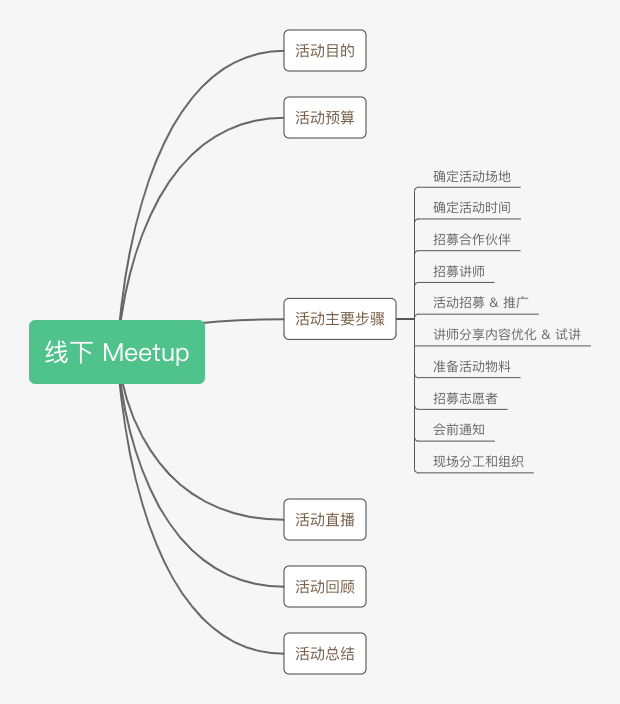
That is the process and key points for organizing an offline meetup. If you prefer a visual summary, see the mind map below.
There is a comment system on this blog. You can log in with your GitHub account to leave a comment. I work in open-source community operations. I am far from an expert, but I would love to connect and discuss. My WeChat ID: zhaofawei26.