
As the saying goes, to do a good job, you need good tools. Good tools improve efficiency and reduce repetitive work. Community operations requires skills in many areas: writing, video editing, image processing, and more. To work efficiently, you need tools across these areas.
In this post I will share the tools I use most often.
TL;DR: see the mind map.
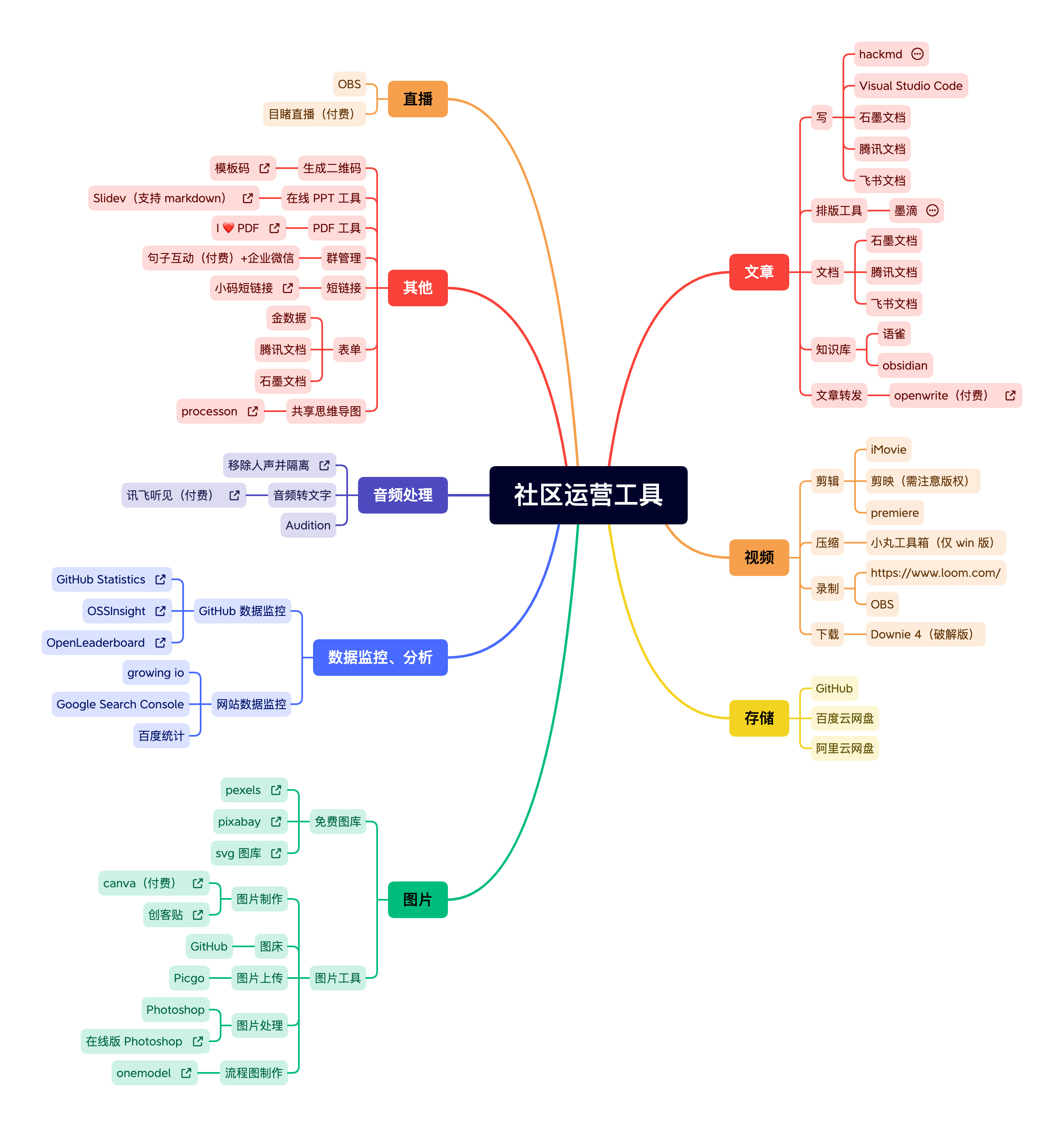
Shared mind map: https://www.processon.com/view/link/642fbae46c39056f08596ee3.
Writing and content#
Writing articles#
I write in Markdown because it is simple and convenient, and many publishing platforms support it. Here are a few tools I recommend.
HackMD#
This is my favorite web-based Markdown editor. The free version is enough for daily use.
Advantages:
- Web-based writing with live preview
- Collaboration (similar to Tencent Docs, Feishu, Shimo)
- Articles are saved under your account
- Export to PDF
Its biggest downside is that it often requires a VPN to access. If you share a link with someone who does not have that access, they cannot open it.
VS Code#
Visual Studio Code is a powerful IDE by Microsoft with rich plugins.
I mostly use it to edit local Markdown files.
Shimo Docs, Tencent Docs, Feishu#
Because of collaboration with colleagues, I frequently use these tools. Their biggest advantage is online storage and collaboration, but they are less friendly for writing and often require extra formatting time.
Tools like Yuque or Obsidian can also be used for writing as part of a personal knowledge base, but I use them less.
Article formatting#
Here I am talking about WeChat public account formatting. The built-in editor cannot convert Markdown in one click, so you need a third-party tool.
I recommend MdNice.
It is a web-based formatter with shared CSS themes, and you can also write your own.
Useful features include one-click formatting (automatic spacing between Chinese/English and numbers, paragraph spacing, etc.) and converting external links into footnotes. Because WeChat articles cannot link out, footnotes are a good workaround.
One-click cross-posting#
If you want to post to multiple tech communities (CSDN, SegmentFault, Juejin, OSChina, CNBlogs), you can use MdNice or OpenWrite.
MdNice is free. OpenWrite is paid (199 RMB per year) but more stable and can sync reading stats.
Video editing#
iMovie#
iMovie comes with macOS. It is simple and fast, but limited in features, so it is not ideal for complex editing. I often use it to edit meeting recordings.
Jianying (CapCut)#
CapCut is an excellent editor. It is easy to learn and has rich features, enough for most daily needs. If you publish outside of Douyin/TikTok, pay attention to copyright (including fonts).
Other tools#
Professional editors like Premiere and DaVinci are powerful but harder to learn.
Besides editing, you may need to record, compress, or download videos. Recommended tools:
- Recording
- OBS
- Loom
- meeting software recorders
- Compression
- XMedia Recode (Windows-only, slower but good quality)
- Downloading
- Downie 4 (cracked)
Audio processing#
Community work sometimes involves audio. For speech-to-text, tools like iFlytek Hearing (paid) are affordable and accurate.
For podcasts (KubeSphere has KubeSphere Talk), multi-track editing is needed. Adobe Audition is powerful and relatively easy to learn.
Image processing#
Image hosting#
If you need a free, ad-free, stable image host, GitHub is a good choice. Create a private repository and upload images. The downside is that access can be unstable without a VPN.
Upload tools#
With an image host, upload tools save time. I use PicGo, which is free and easy. Configure it once and you can upload quickly. PicGo also supports Qiniu, Alibaba Cloud, and Tencent Cloud.
Image editing#
I mostly use Photoshop and have not found a better alternative. If you want something simpler, try Photopea, a web-based Photoshop alternative.
Image design#
I recommend Canva and Chuangkit. They are enough for daily use. For commercial use, paid plans are better.
Free stock images#
If you do not want to make images yourself, use free stock sites like Pexels and Pixabay. Both offer high-quality images. Another good SVG site is SVGRepo.
Flowcharts#
For flowcharts or open-source diagrams, try OneModel. It has a large icon library and you can even contribute icons.
Storage#
Storage is a universal need. Here are two options:
GitHub#
GitHub is free and unlimited for documents and images, though access can be unstable.
Cloud drives#
I recommend Aliyun Drive and Baidu Netdisk. The gap between Baidu’s free and paid tiers is large. Aliyun often offers promotions, so you can get a large storage quota without paying.
Data monitoring and analytics#
GitHub metrics#
To track stars, forks, commits, and changes, use:
- GitHub Stats by the NebulaGraph team
- OSSInsight by the TiDB team
To analyze recent activity of open-source projects, use OpenLeaderboard by X-lab.
Website analytics#
For your own website, use analytics tools such as GrowingIO (paid), Google Search Console, or Baidu Analytics (free).
Other tools#
QR code generation#
I recommend Mobanma, which can generate QR codes in different styles and embed a logo.
Mind maps#
I recommend ProcessOn. The free tier allows nine mind maps and supports sharing and collaboration.
Online PDF editing#
PDF editing is hard. The tool I use can delete pages, merge PDFs, and convert formats: I Love PDF.
These are the tools I use most in daily community operations. There are other useful tools I did not cover due to length. If you want recommendations in a specific area, feel free to reach out. If you have other good tools, please share in the comments.
Also, these tools are not necessarily the best in their category. I recommend them because they are familiar and good enough for me.
There is a comment system on this blog. You can log in with your GitHub account to leave a comment. I work in open-source community operations. I am far from an expert, but I would love to connect and discuss. My WeChat ID: zhaofawei26.